In compliance, controls are the specific security and operational requirements an organization must meet. Drata provides out-of-the-box controls mapped to tests, evidence, policies, risks, and framework requirements that automate the work of proving compliance. Enterprise customers often come to Drata with their own compliance program already in place, meaning they've worked with auditors to build a custom control set that fits their compliance goals. Connecting their custom set to Drata's automation engine (tests, evidence, policies, risks, requirements) is essential to getting value from the platform during onboarding and throughout our customers' compliance journey.
The problem was that doing this wasn't self-serve. Customers had to engage Drata's Compliance Advisory (CA) team, share a spreadsheet of their custom controls, wait for the team to run it through an internal AI tool, review a recommendations mapping sheet, and then wait again while the CA team executed every mapping manually in the customer's tenant. The whole process took approximately 6 weeks, 6 weeks before a customer could even begin seeing compliance coverage or automation value from Drata.
The Mapping Agent was designed to give customers back that time and remove the dependency entirely. Customers would upload their custom controls directly, receive AI-generated mapping recommendations grouped by object type and labeled by confidence level, and review, accept, or deny them on their own schedule, without ever needing to involve a Drata team member.
This was a 0-to-1 initiative for Drata: a new surface, a new interaction model, and one of five core agents the company was planning to release as part of its broader AI roadmap.
I was the sole designer on this initiative, leading end-to-end from discovery through final designs, partnering closely with the AI Director across both research and design.
- Led 6 moderated research sessions with enterprise customers using an interactive prototype, translating findings into the interaction requirements and patterns that would govern how recommendations were surfaced, reviewed, and acted on.
- Established trust patterns for agentic experiences, defining also specific guidelines through this project for how recommendations should be surfaced, labeled, explained, and controlled. Trust patterns intended to apply across all agentic capabilities planned for the platform.
- Designed the phased delivery model, scoping the first release to custom controls to Drata objects, while advancing designs for custom risks and custom frameworks ahead of engineering commitment.
- Pushed for a new AI settings model as part of this project, moving Drata from a single global AI toggle to granular, feature-level AI controls, which was a prerequisite for introducing auto-approval rules for the mapping agent.
- Explored entry point designs within the broader Drata AI vision, contributing explorations for how the mapping experience would live within a unified AI home page designed to hold all of Drata's agentic workflows.
As part of establishing Drata's AI design foundation, I defined the Trust Arc, a product vision based on a four-stage AI personality model I established during a previous project I worked on: the first Agent Drata launched, a TPRM Agent. The Trust Arc described how AI shows up at different levels of autonomy. The four personalities (Sentinel, Advisor, Collaborator, and Operator) each represent a different relationship between the system and the user, progressing from observation and reporting toward fully independent action as trust is earned. Before designing the Mapping Agent, we needed to establish which personality was the right starting point.
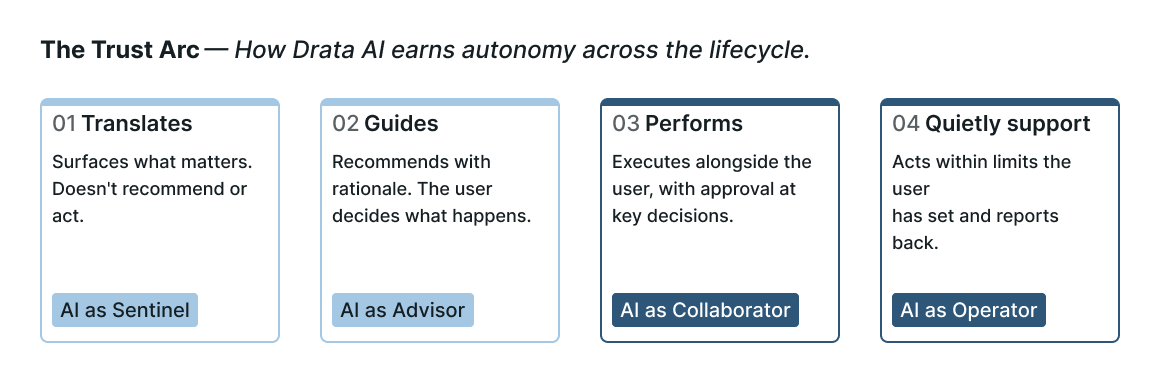
Trust Arc — four autonomy levels, each representing a different relationship between the system and the user
Object mappings directly affect compliance posture. An incorrect relationship, such as a test connected to a control it doesn't actually satisfy, can create false confidence and compliance posture, scaling to audit risk if not addressed. That made Advisor our best starting point: AI that guides, shows its work, and leaves every decision to the user to build enough trust to then progress to a higher autonomy experience, enabling auto-approval rules and moving toward Collaborator behavior where the AI executes with user approval at key checkpoints.
To build that trust, I grounded the experience in a set of transparency guidelines I established for AI-powered recommendation experiences at Drata:
Users needed to see which object was being recommended, which object it was being mapped to, the confidence level of that recommendation (high or medium), and the rationale behind it as a persistent, visible part of the review surface.
Users could accept or deny recommendations individually or in bulk. They could later modify accepted recommendations.
High confidence meant language similarity and signal strength met a higher threshold. Medium meant a reasonable match that warranted closer review. No recommendations were auto-applied without explicit user action or permission.
These guidelines became part of the foundational patterns I documented for Drata's design org to be applied consistently across agentic recommendation experiences on the platform.
I ran 6 moderated research sessions with enterprise customers using an interactive prototype. The AI Director joined every session. The goal was to understand how customers reasoned about AI recommendations, what information they needed to act on them confidently, and where the original design assumptions held up against real user behavior.
The first version of the experience presented a 1:1 relationship to map custom controls to Drata's OOTB controls. Drata controls are pre-mapped to tests, evidence, policies, and other objects, so mapping through controls would unlock all of that downstream automation. If a custom control had multiple recommendations, the user would see multiple rows on the table for that control, each row representing a different Drata control being recommended.
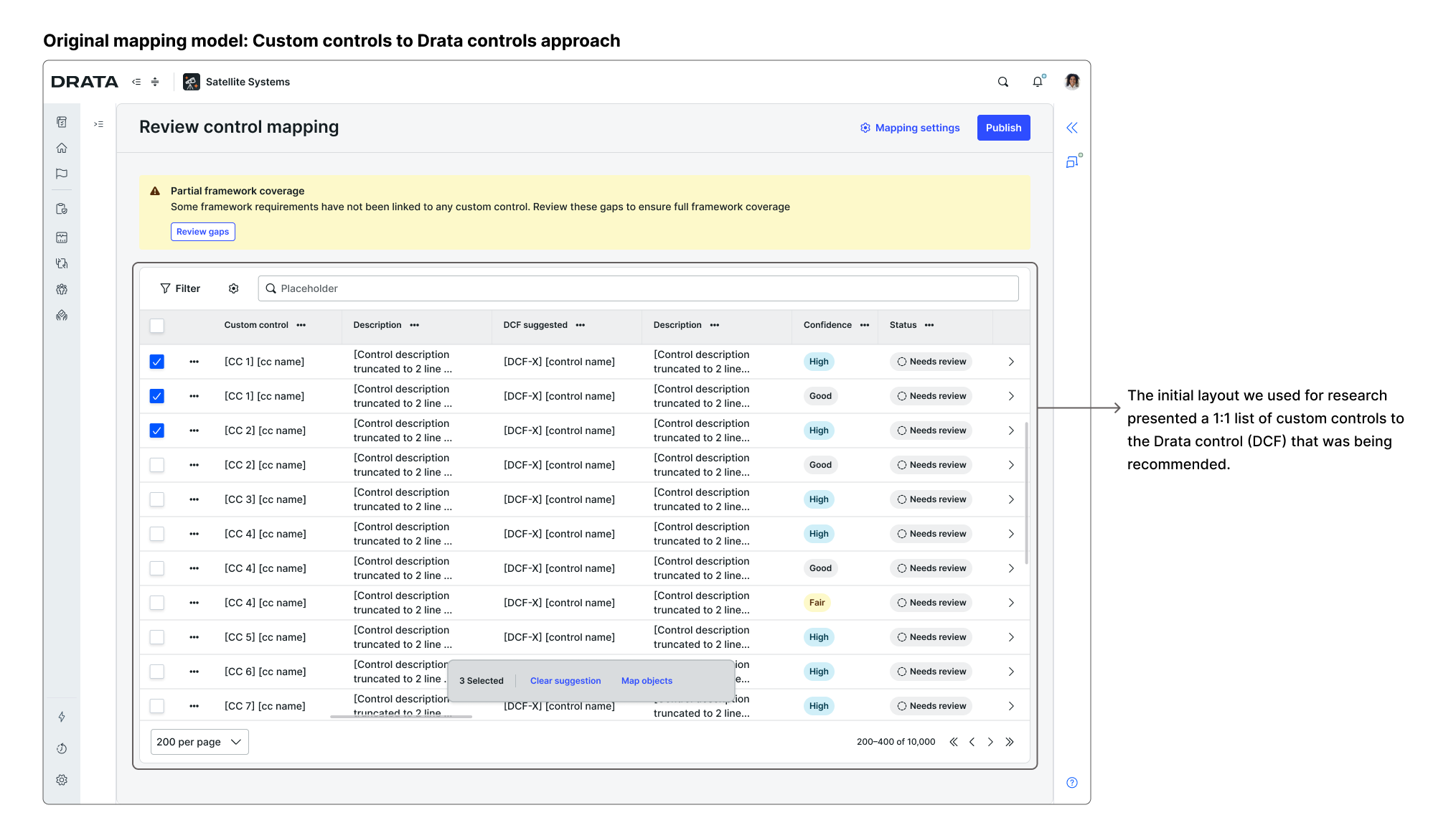
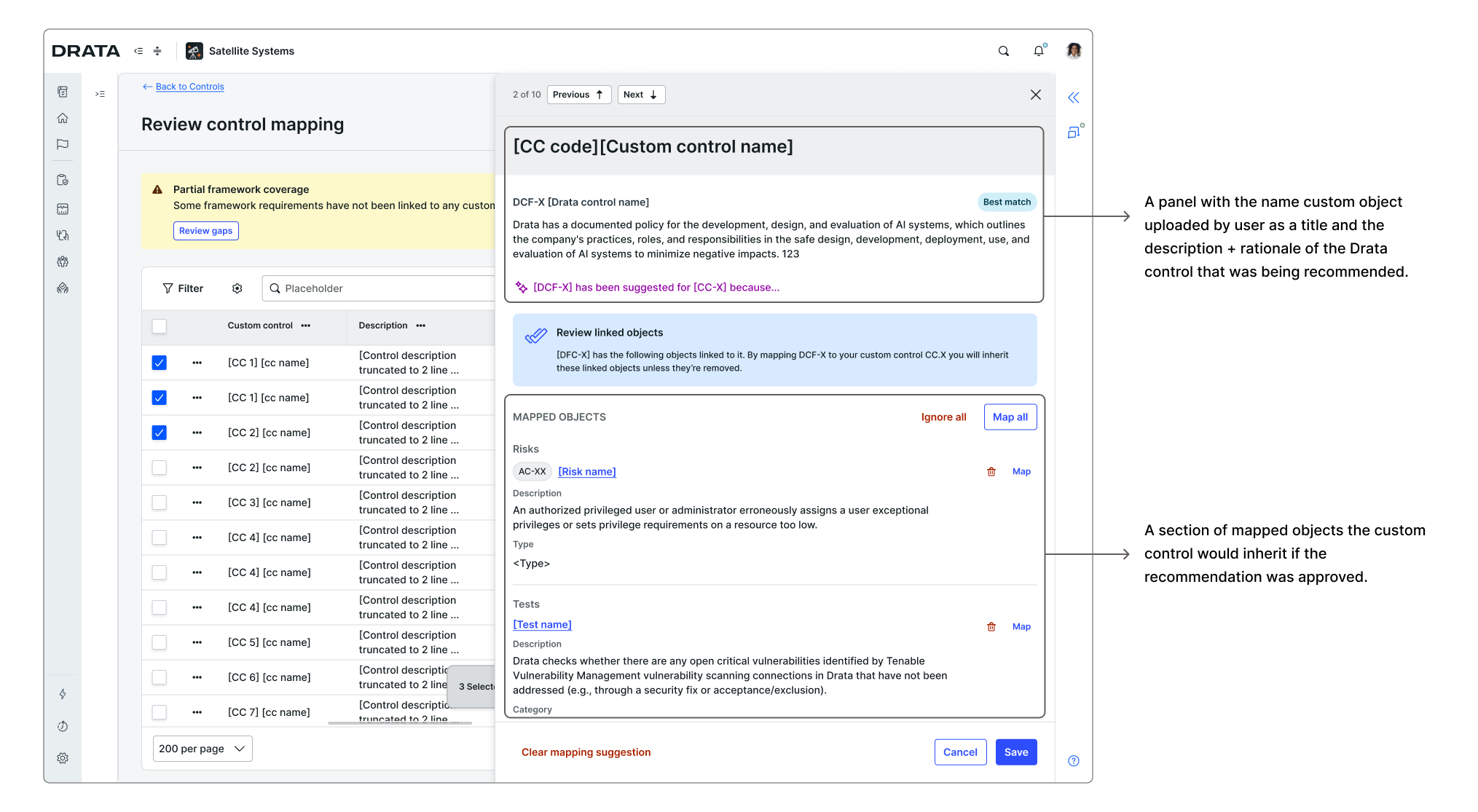
Research version — original 1:1 mapping model tested in moderated sessions
The following insights from this round of research shaped the design significantly, changing the fundamental structure of the experience.
The original mapping model didn't match how users thought about their work. We noticed users wanted to have more granular control on which specific tests, evidence, risks, requirements, and policies would apply to their custom controls. Mapping to a Drata control first seemed like a good approach at first, since it was a relationship between two objects of the same type (controls to controls), but it was also an extra step that decreased the visibility of that granular control and added abstraction.
We pivoted the model: custom controls would map directly to Drata objects, bypassing the Drata controls layer. Instead of asking users to adapt to Drata's internal architecture, we adapted the experience to how users actually thought about their own compliance work.
"So I think it actually does help make a better decision if you're like, oh, this control, they're looking for a user access review and that's what the evidence is for my custom control."
User control today is the foundation for AI autonomy tomorrow. Users weren't resistant to the idea of AI doing more over time, but they needed to build trust with it first. The research made clear that having control over which recommendations would get mapped was the condition under which users would be willing to engage with AI at all, and the foundation from which a more autonomous experience could be earned. So we designed the review and approval flow with the goal to build enough trust with customers that they would feel confident enabling auto-approval rules and delegating more to the system over time.
"I'm a little bit of a control freak, so I would want to ensure that everything looks matched correctly [before approving a mapping]."
After this round of research I iterated on our approach and designs to better align with our users mental model. The changes applied are presented in the following section.
The mapping experience was designed to support two complementary modes of review: a dedicated bulk review surface for processing many recommendations at once, and an in-context view embedded in individual control detail pages for reviewing one control at a time. Users could move between both based on their workflow and preference.
Users upload their custom set of controls as a structured file. The system parses the content and begins generating AI recommendations based on language similarity to Drata's existing objects.
One constraint worth noting: the upload step was built on Drata's existing integration with Flatfile, a bulk upload tool already embedded in the platform. The Flatfile experience wasn't ideal for this use case and introduced more friction than a purpose-built flow would have. But replacing it or building something new would have significantly delayed delivery, so the team aligned on the tradeoff: get the core mapping value to customers faster using what already existed, and improve the upload experience as a follow-on investment. Shipping something functional before shipping something perfect was decided based on how much was at stake for customers waiting on this capability.
Upload and parsing — the system ingests custom controls and begins generating AI-powered mapping recommendations
Moving away from a 1:1 relationship table for custom controls to Drata controls recommendations, the main review surface now presented a list of the uploaded custom controls and a summary of the objects recommended to each one. The view is organized by object type: all tests grouped together, all evidence grouped, all policies grouped. Each recommendation includes a confidence label (High or Medium), and the rationale behind the match. Users can accept, deny, or substitute individual recommendations, or act in bulk across an entire group.
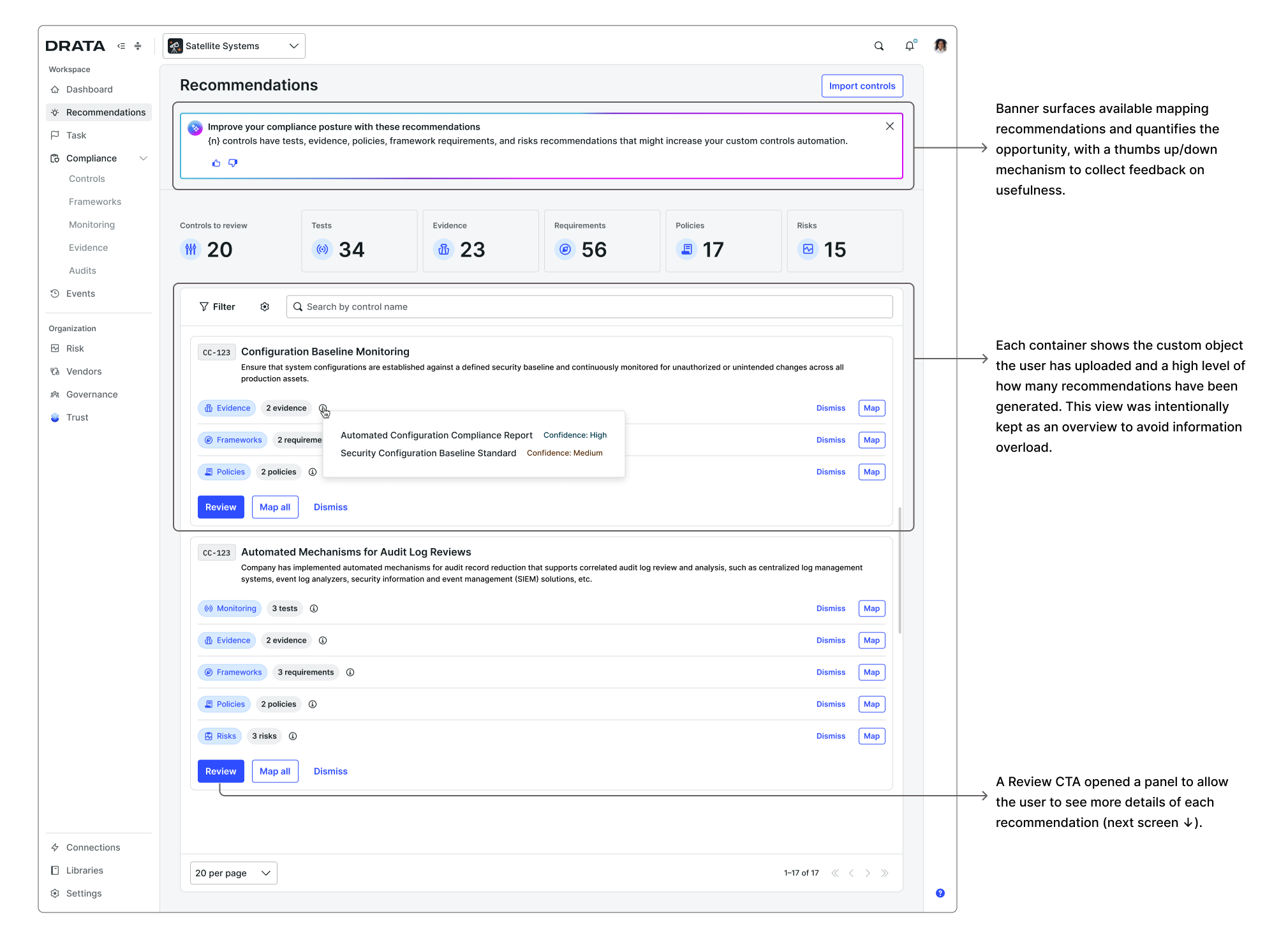
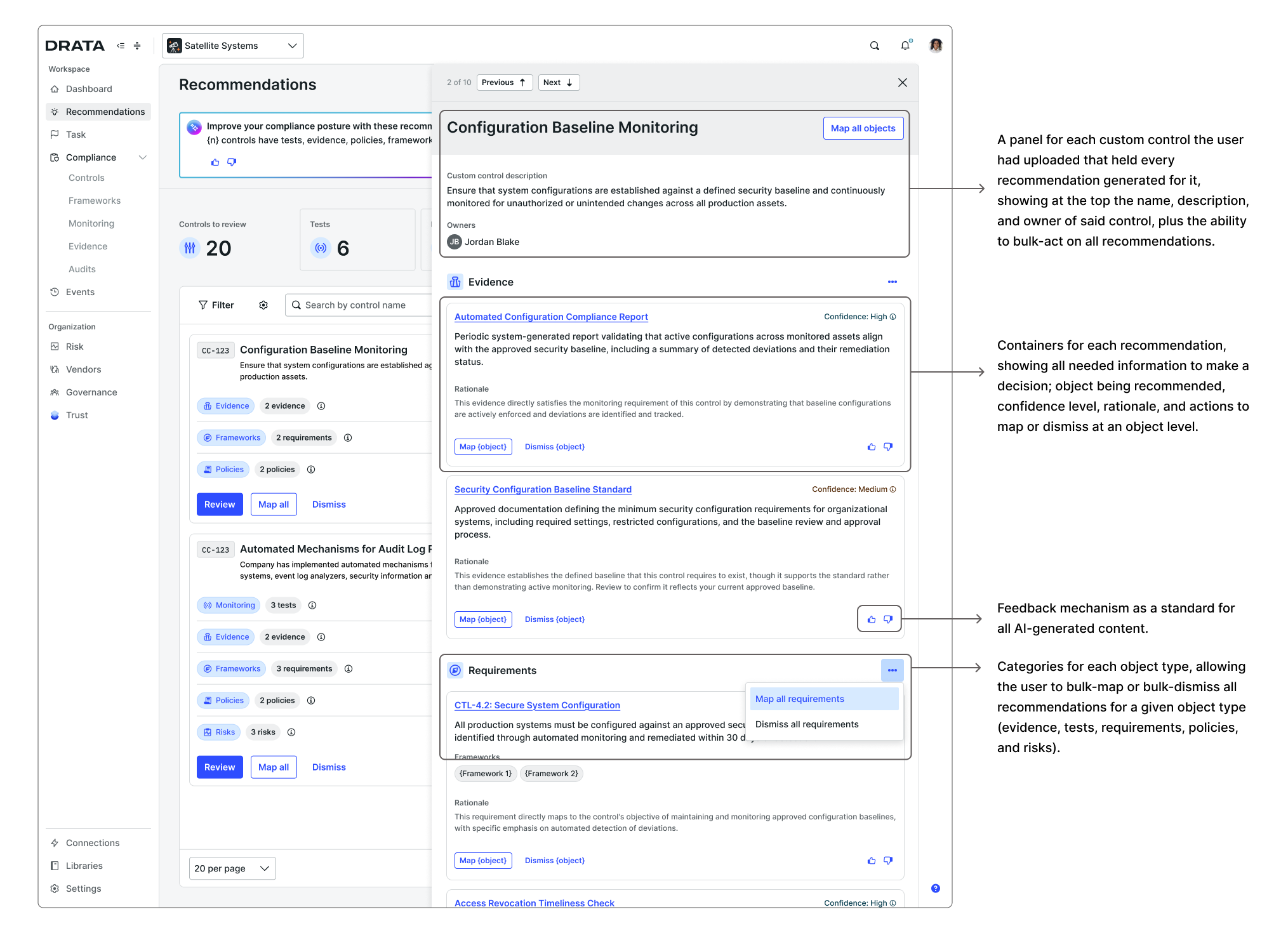
Bulk review — recommendations organized by object type, with confidence labels and rationale visible at a glance
Users who prefer to review recommendations individually within the context of a specific control can do so from that object's detail page. Recommendations surface inline with objects that have already been mapped.
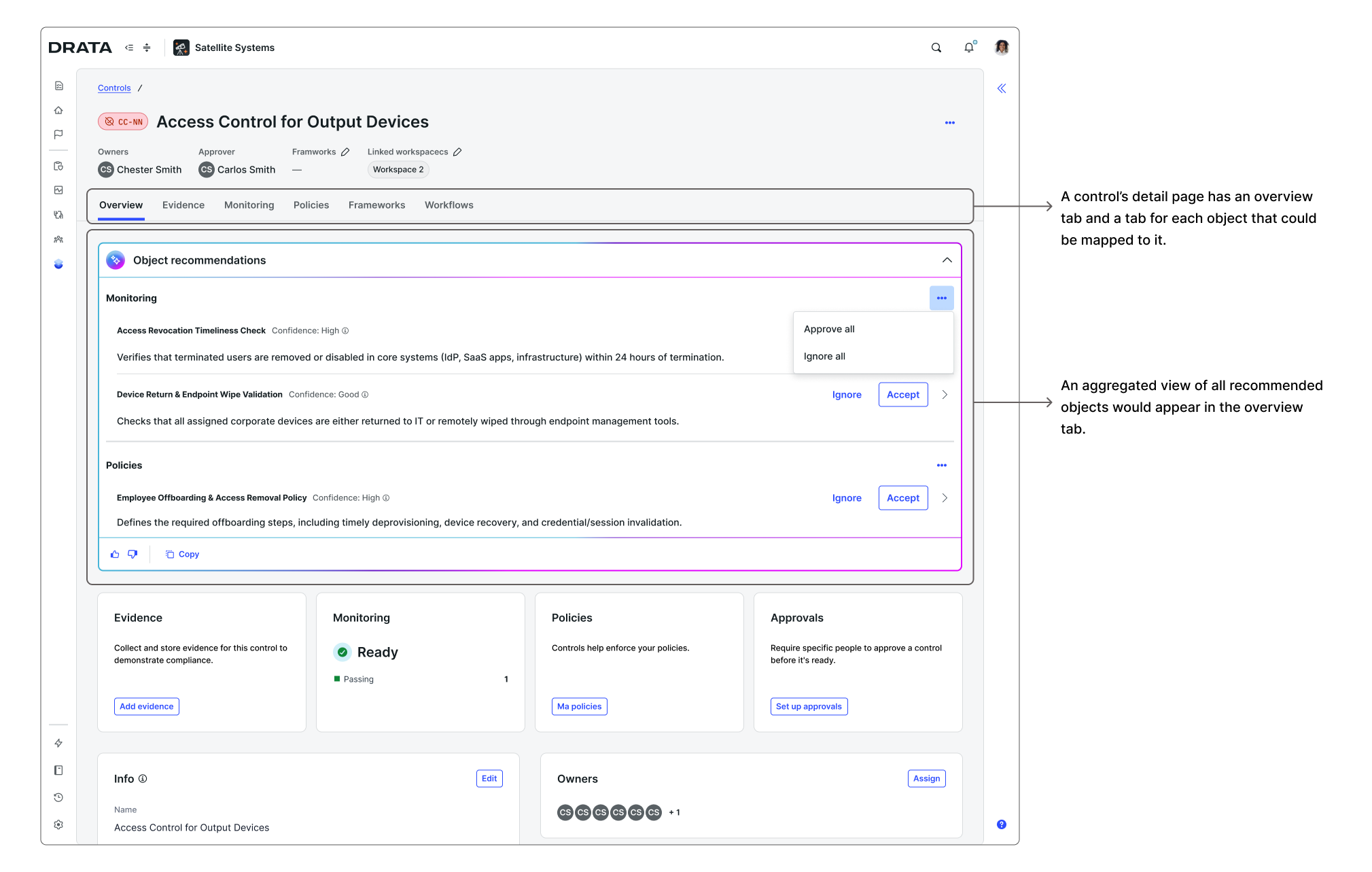
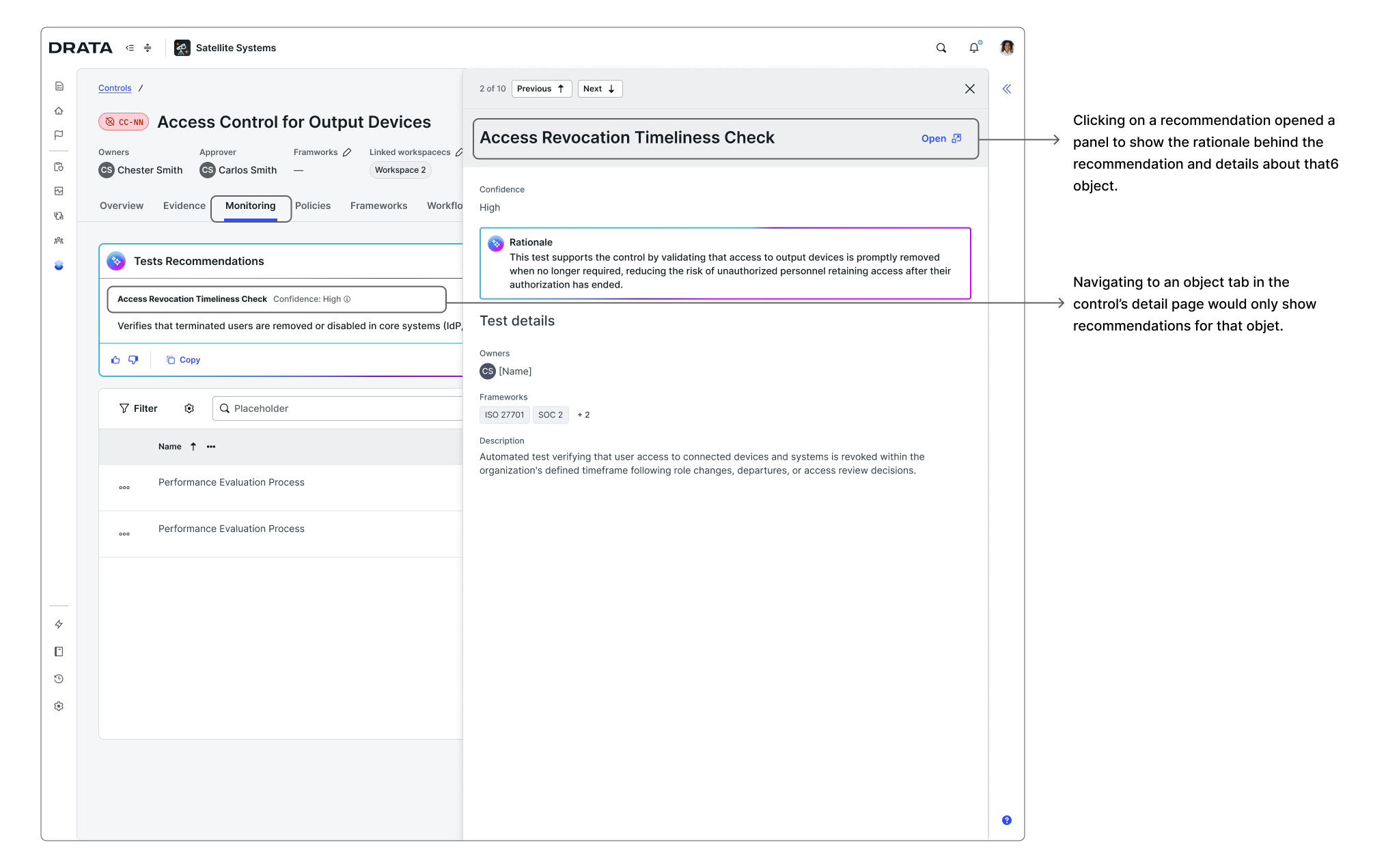
In-context review — recommendations surfaced inline within the control detail page for one-at-a-time review
Review progress is saved continuously, so users can complete the mapping across multiple sessions or collaborate with teammates without losing work. The stats at the top of the page keep track of remaining objects to review.
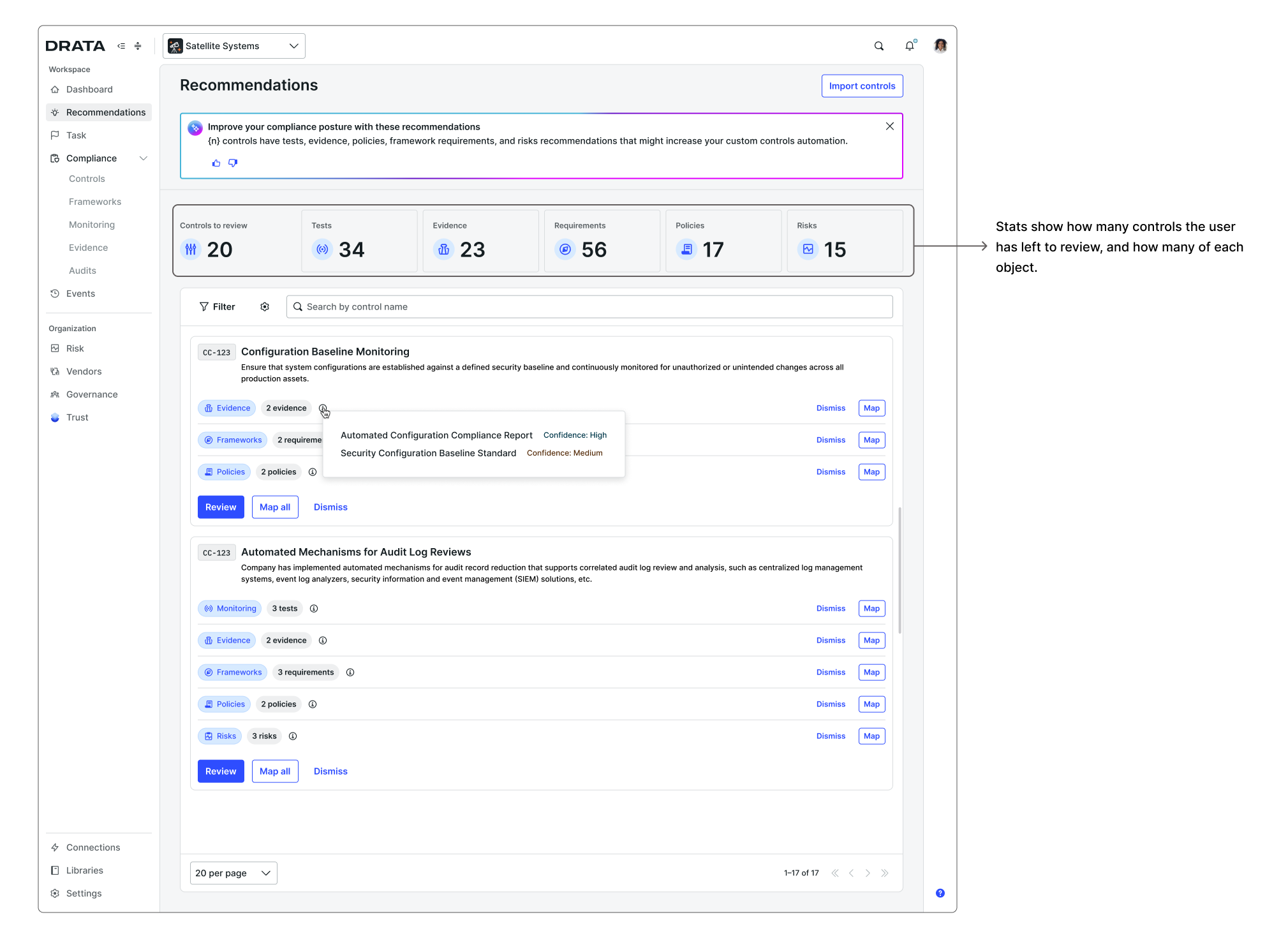
Progress and collaboration — continuous save and a progress tracker so teams can pick up where they left off
The interaction model established for custom controls was designed from the start to extend to other object types. Once the core patterns were in place (the upload flow, grouped recommendations, confidence labels, rationale, bulk review, and individual in-context review) scaling to custom frameworks and custom risks was a matter of applying them to a new context rather than redesigning from scratch.
Custom framework requirements mapped to Drata controls (both OOTB and custom), and custom risks mapped to Drata controls following the same review and approval model. The experience felt consistent across all three because the underlying patterns held.
Risks
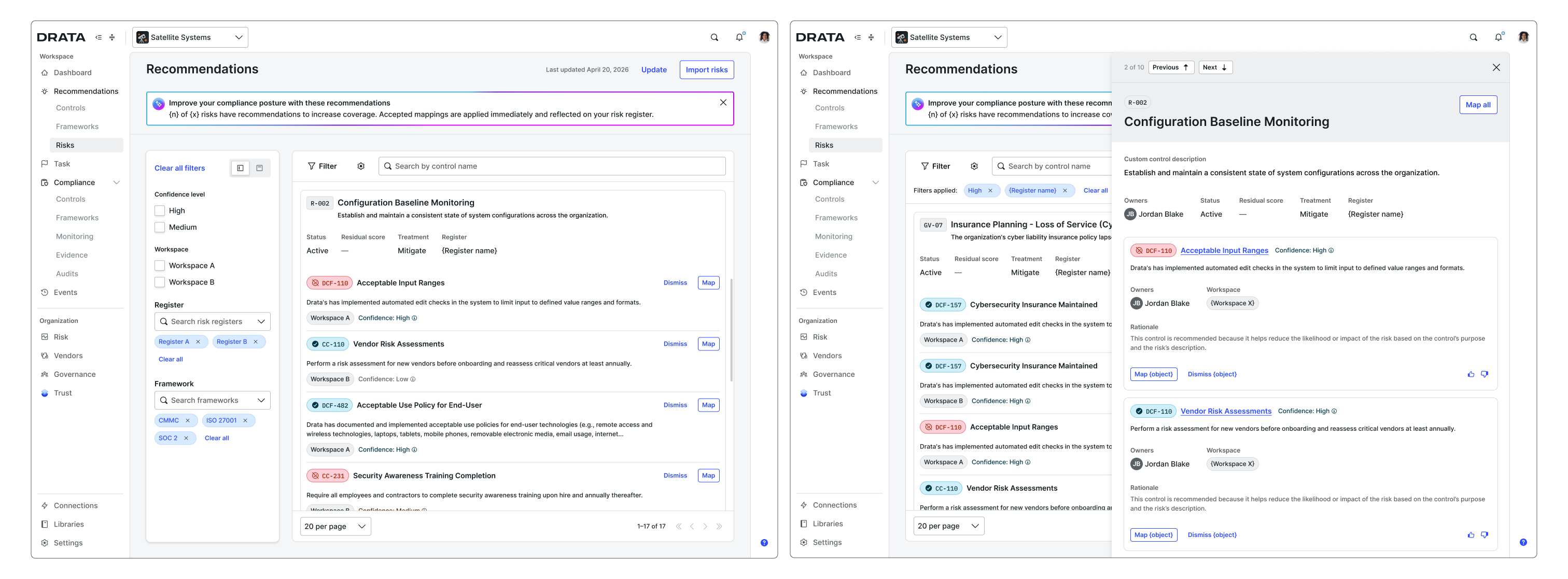
Risks bulk review — same interaction model applied to custom risk-to-control mapping
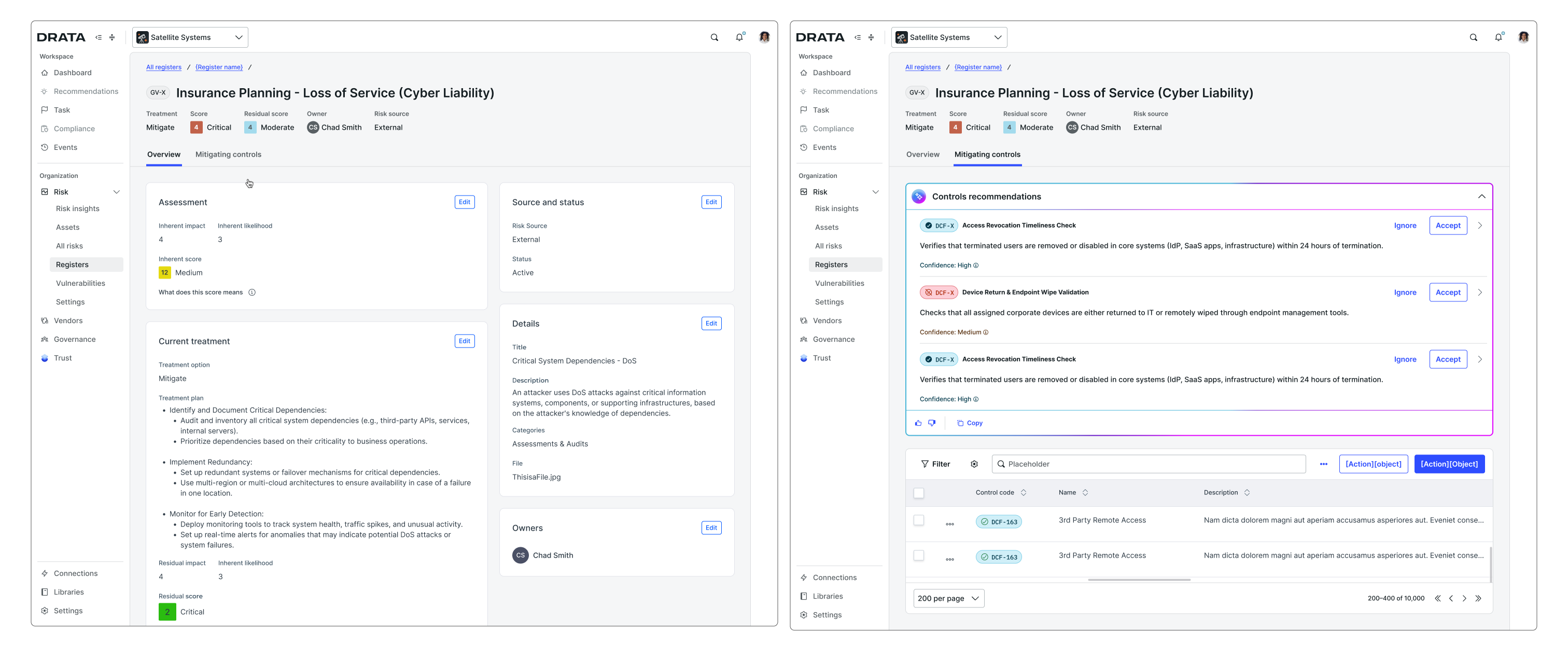
Risks in-context review — recommendations inline within the risk detail page
Frameworks
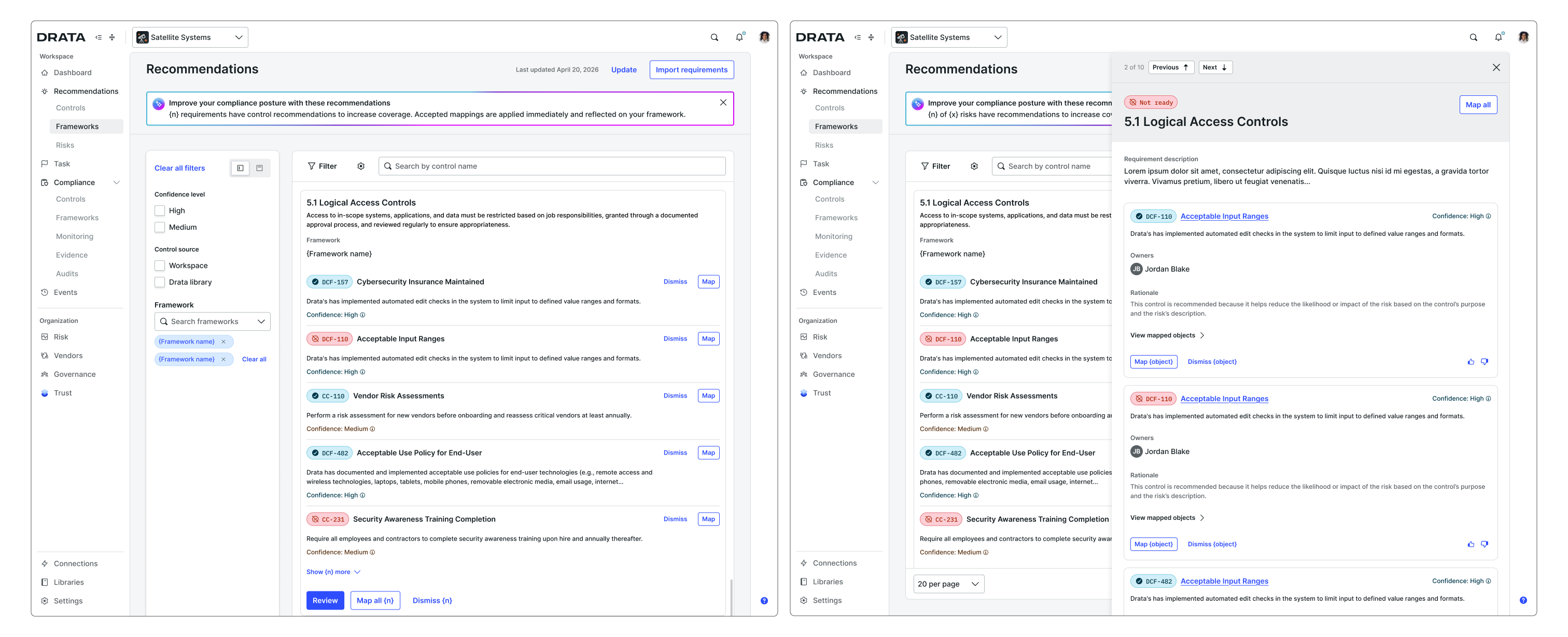
Frameworks bulk review — same model applied to custom framework requirement-to-control mapping
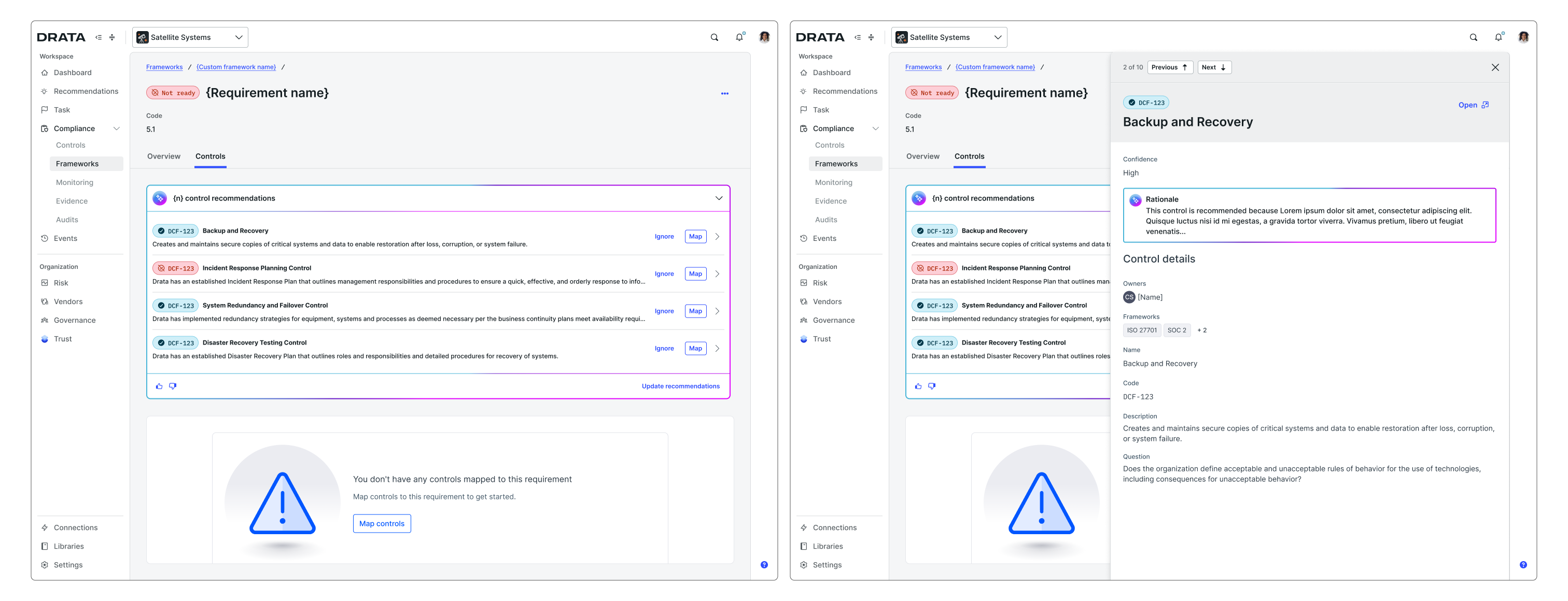
Frameworks in-context review — recommendations inline within the framework requirement detail page
Phased scope to match model reliability
One of the most important constraints was AI model quality. Recommendations are only valuable if the model is reliably surfacing accurate matches, and we knew quality would vary across object types. Since the CA team was stopping manual support for this process, the stakes of shipping a low-quality experience were high.
We decided to ship custom controls to Drata objects first, validate quality and real-world adoption, and then follow with custom frameworks to controls (including both Drata and custom controls). Custom risks to controls was descoped to a later phase.
This phasing allowed us to get the highest-confidence use case into customers' hands quickly, learn from actual usage before expanding scope, and de-risk the more complex mapping relationships.
Bulk review and in-context review as complementary surfaces
The bulk review surface was built and released first as the fastest path to getting mapping capability into customers' hands. We knew both modes were needed, some users would approach mapping as a large batch operation, while others would want to review recommendations in context, within the detail page of a specific control or framework requirement, but waiting until both were ready would have delayed the core value significantly. The in-context view was designed in parallel and scoped as a close follow-up to the initial release rather than a dependency on it. Speed to value drove the sequencing.
Using Claude to prototype the bulk review experience
Because this was a genuinely new interaction model for Drata, no prior patterns to reference for a bulk AI recommendation review surface existed. I used Claude Code to rapidly generate and explore different structural approaches before committing to a direction. That exploration informed how recommendations were grouped, how confidence was surfaced, and how bulk actions were scoped. (Those early prototypes no longer exist, but the decisions they informed through exploration made it into the final designs.)
Auto-approval rules as the path toward greater autonomy
The bulk review experience was built with a future state in mind: auto-approval rules that would allow users to automatically accept high or medium confidence recommendations without manual review.
Introducing auto-approvals also required rethinking Drata's AI settings model. At the time, AI was configured through a single global toggle. There was no way to enable or disable AI at the feature or capability level. We pushed for that settings enhancement as part of this project, moving toward a model where users could configure AI behavior per capability, which was needed to be able to enable auto-approvals rules for the mapping agent. This was fully designed but not yet shipped before I left.
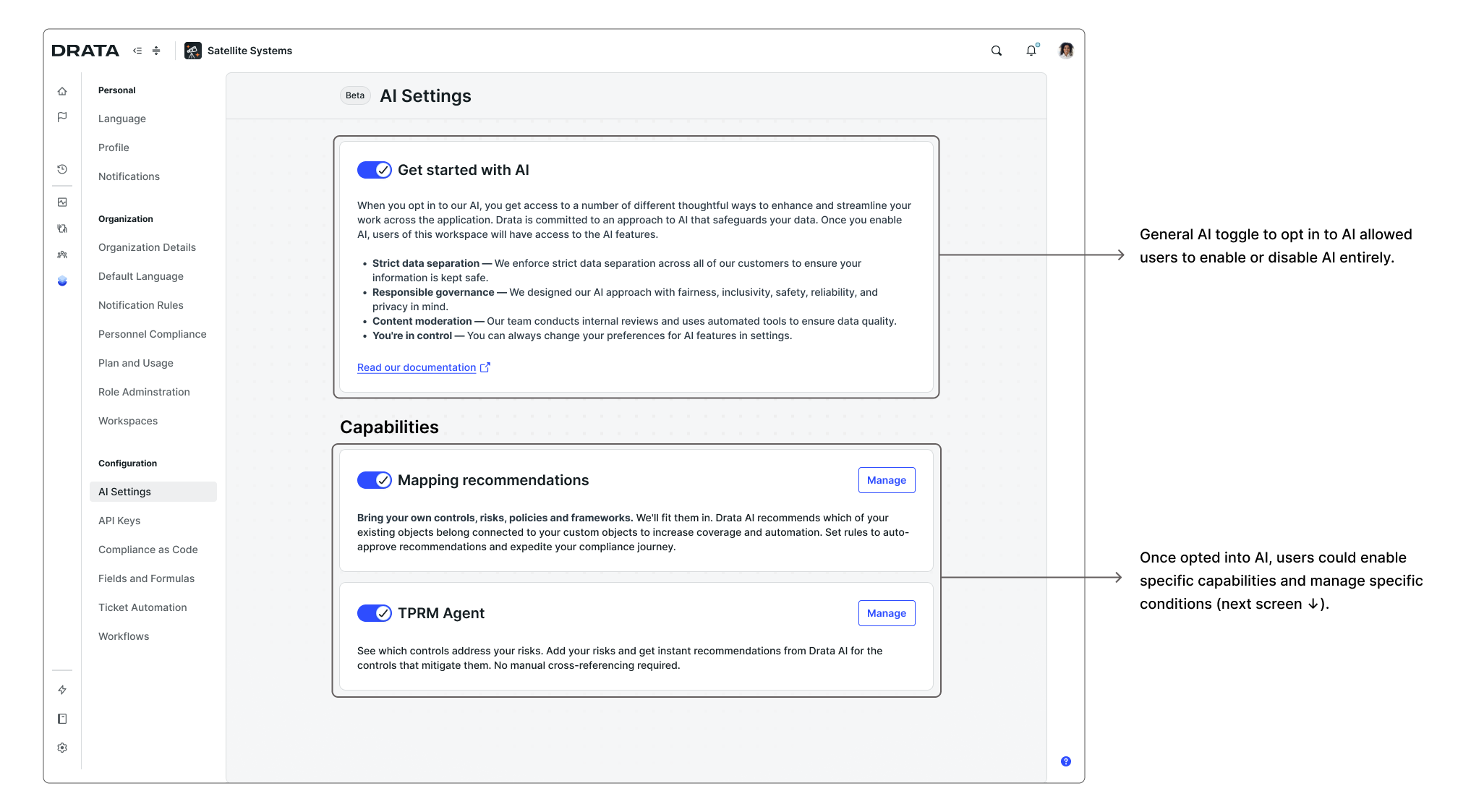
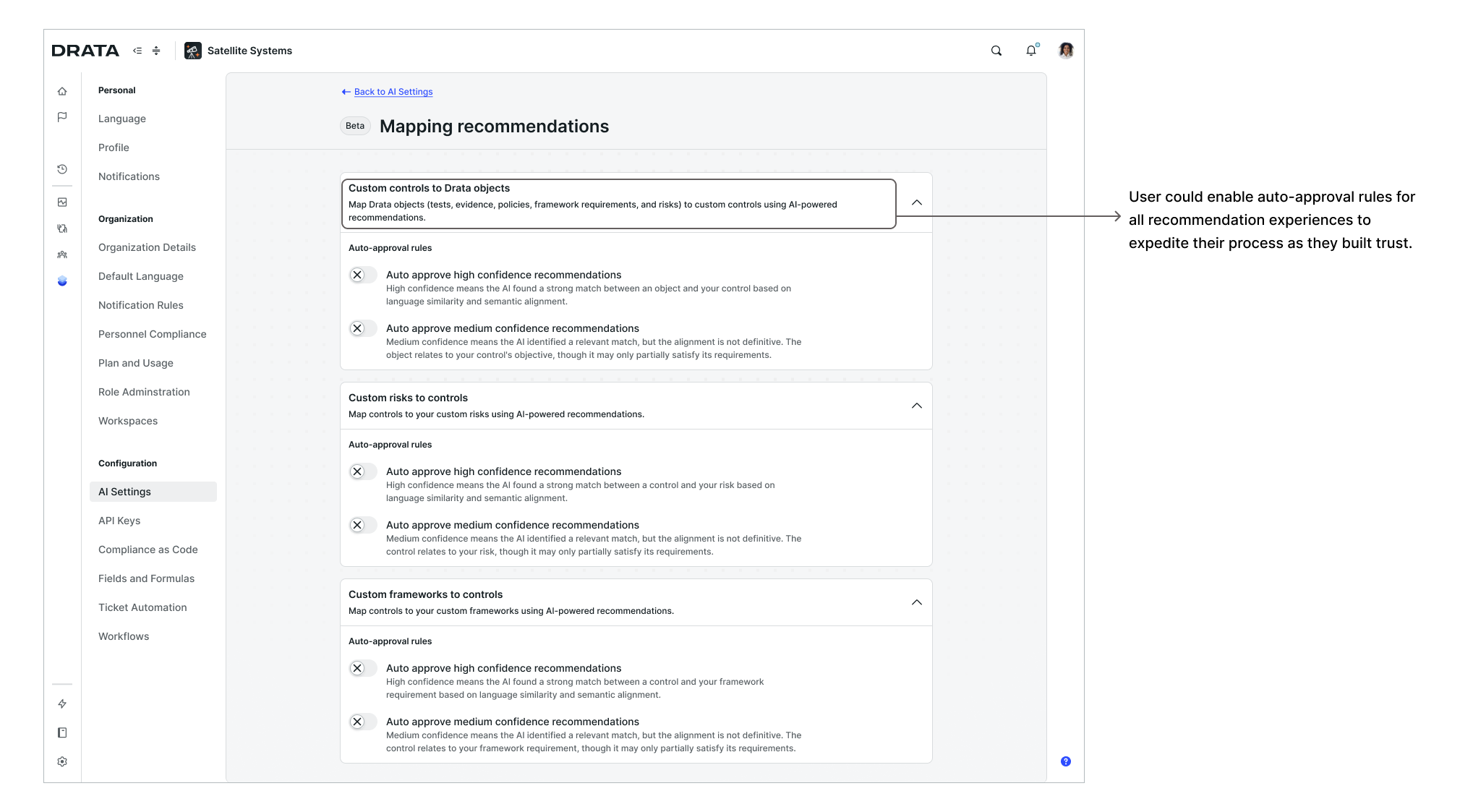
AI settings model — granular, feature-level controls including auto-approval rules for the mapping agent
The Mapping Agent was one of five core agents Drata had planned for its AI roadmap. As part of that broader strategy, a Drata AI home page was in design as a central hub for all agentic workflows and the intended entry point for a conversational AI experience across the platform.
I contributed explorations for how the mapping experience would be surfaced from that home page, including how customers would initiate a new mapping session as part of a unified AI-first entry point.
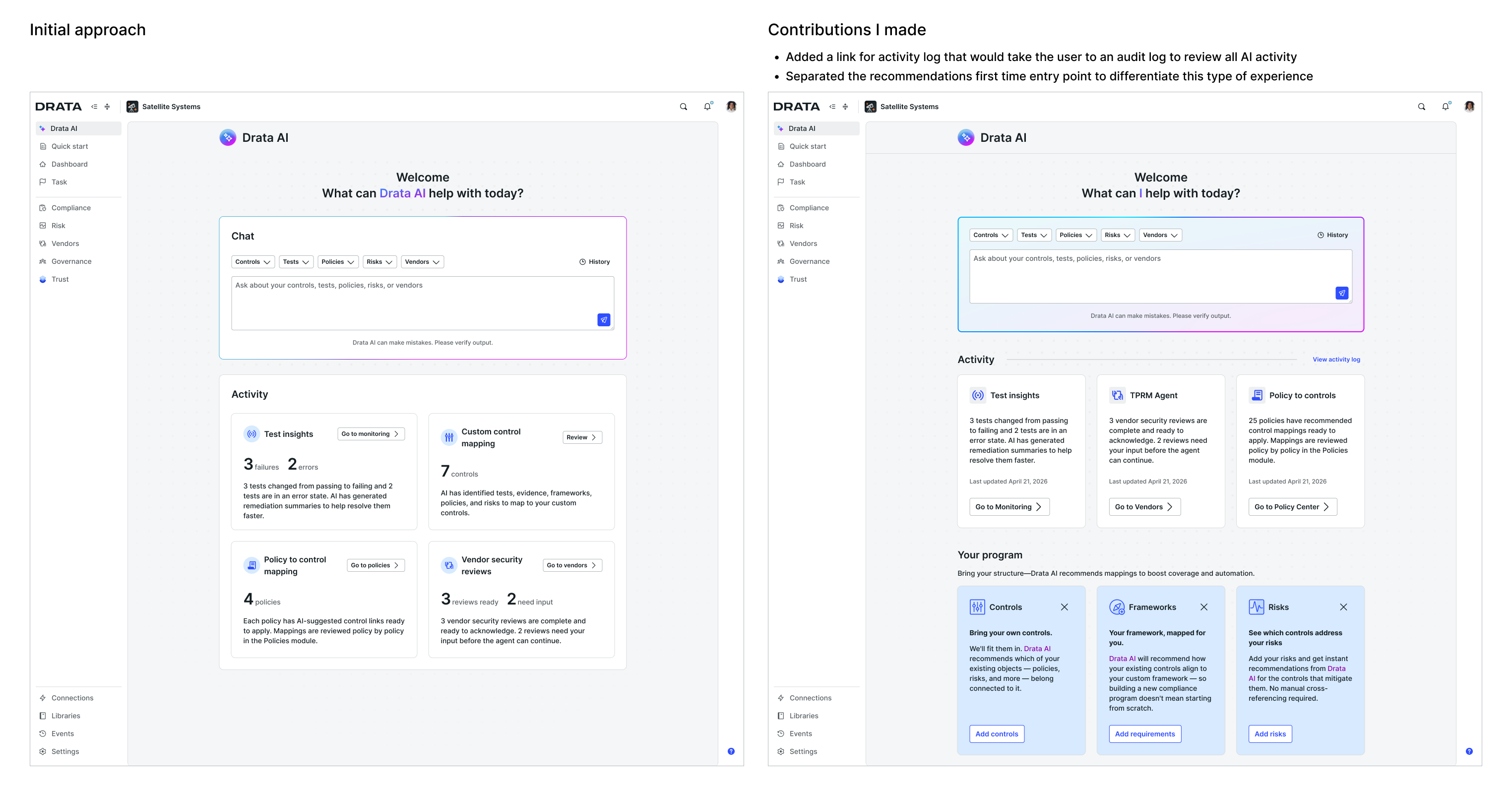
Drata AI home page, an exploration of a unified entry point for all agentic workflows across the platform. The initial approach was created by a peer designer, the screen on the right represents my contributions to incorporate new guidelines and AI direction.
These explorations represent design work that was directionally aligned with the team but did not yet have engineering assigned at the time I transitioned out of the role.
- Reduced a 6-week Drata-assisted process to hours through a self-serve AI recommendation workflow, shipped and validated with real customer adoption
- The underlying patterns held across all three object types: the same interaction model, trust patterns, and AI experience extended cleanly to custom risks and custom frameworks, verified through research with enterprise customers
- Research-driven pivot became the system's foundation: mapping custom controls directly to Drata objects instead of through the controls layer, reshaping how the whole platform's automation engine gets used
- Surfaced a platform-level gap and got it scoped: pushed for Drata's AI settings model to move from a single global toggle to per-feature configuration, needed to support auto-approval rules; fully designed but not yet shipped when I transitioned out
This project allowed me to go even deeper into the core patterns and guidelines of how Drata designs for AI. It also brought real challenges: balancing technical constraints, delivering value quickly, and building enough trust with users to drive adoption. The phasing decision wasn't only a product scope call. It was also about building trust with our users. Shipping the highest-confidence use case first, learning from real usage, and expanding from there was our approach to earn that trust incrementally.
Research shaped this project more fundamentally than I expected going in. The pivot from mapping to Drata controls to mapping directly to Drata objects was a complete structural change that came entirely from taking a step back from Drata's core architectural and operational beliefs and listening to how users thought about their own work and the needs they had. Drata controls had always been the centerpiece of our platform, so moving away from that challenged a core assumption about how the product operated. But it put customers' mental models ahead of our internal architecture, which is exactly what good product design requires.
Working within existing constraints was something Drata embraced, and this project was a good example of that in practice. Getting value to customers quickly and learning from real usage mattered more than waiting to make the experience perfect. Shipping something functional first allows us to iterate faster and with more confidence.
Pushing for the AI settings enhancement was a good example of how a single feature can surface a platform-level gap. Auto-approval rules needed a more sophisticated approach to how AI is configured across the product. Getting that change scoped as part of this project was an important milestone for the team. We introduced a new capability and raised the bar for how agentic features should handle AI configuration going forward.
This project reinforced that incremental, trust-first design and business impact go hand in hand, especially in an AI space that moves as fast as this one. Phasing scope, grounding decisions in research, building for user control before expanding autonomy are great practices I like to include in my projects.